
String parser: Built-in commands and syntax
SadConsole provides six commands by default. Build a command with this string format: [c:{command} {parameters}]. The [c: text starts the command sequence, and ] ends it. If the command is invalid, SadConsole doesn’t process it and the command text appears in the string. Once you create a command in the string, SadConsole puts it on a stack and applies it to each character. Most commands apply to a specific count of characters but otherwise affect the rest of the string. Use the [c:undo] command to stop the last command added to the stack.
Some commands have optional or mandatory parameters. Place a space character between the command and the parameters.
| Command | Format | Description |
|---|---|---|
| r,recolor | [c:r f|b:color[:count]] | Recolor the foreground or background |
| m,mirror | [c:m 0|1|2|None|FlipHorizontally|FlipVertically[:count]] | Set SpriteEffect (mirroring) |
| u,undo | [c:undo [count:f|b|g|e|m|a]] | Remove the last command on the command stack |
| b,blink | [c:b [count:speed]] | Blinks a set of characters |
| g,grad | [c:g f|b:color[:color]:count] | Applies a gradient across a set of characters |
| sg,sglyph | [c:sg glyph index[:count]] | Sets the glyph for the count of characters |
Color parameters
Section titled “Color parameters”If a command uses a color parameter, you can specify it in the following ways:
-
rgb
Red, green, and blue as a byte value. -
rgba
Red, green, blue, and alpha as a byte value. -
name
A named color from the MonoGameColortype (also supported in SFML). -
default
The default color of the surface.
Examples
Section titled “Examples”The following examples demonstrate common command usage.
-
Set foreground to Color.Blue and background to Color.Yellow
"Normal [c:r f:Blue][c:r b:Yellow]and colored" -
Set foreground to RGBA and background to RGBA
"Normal [c:r f:0,0,255,255][c:r b:255,255,0,255]and colored" -
Set foreground to RGB and background to RGB. Alpha 255 assumed
"Normal [c:r f:0,0,255][c:r b:255,255,0]and colored" -
Set foreground to red but adjust only the blue color channel after
"Normal [c:r f:red]and [c:r f:x,128,x]adjusted" -
Remove last two commands at different spots
"Normal and [c:r f:blue][c:r b:yellow]colored and [c:undo]undo [c:undo]text"
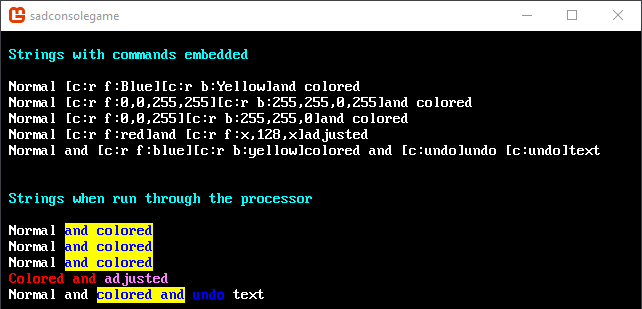
This code prints the example strings:
static void Init(){    int row = 1;
    SadConsole.Global.CurrentScreen.Print(1, row++, new ColoredString("[c:r f:Aqua]Strings with commands embedded"));    row++;
    SadConsole.Global.CurrentScreen.Print(1, row++, "Normal [c:r f:Blue][c:r b:Yellow]and colored");    SadConsole.Global.CurrentScreen.Print(1, row++, "Normal [c:r f:0,0,255,255][c:r b:255,255,0,255]and colored");    SadConsole.Global.CurrentScreen.Print(1, row++, "Normal [c:r f:0,0,255][c:r b:255,255,0]and colored");    SadConsole.Global.CurrentScreen.Print(1, row++, "Normal [c:r f:red]and [c:r f:x,128,x]adjusted");    SadConsole.Global.CurrentScreen.Print(1, row++, "Normal and [c:r f:blue][c:r b:yellow]colored and [c:undo]undo [c:undo]text");
    row += 2;    SadConsole.Global.CurrentScreen.UsePrintProcessor = true;    SadConsole.Global.CurrentScreen.Print(1, row++, "[c:r f:Aqua]Strings when run through the processor");    row++;
    SadConsole.Global.CurrentScreen.Print(1, row++, "Normal [c:r f:Blue][c:r b:Yellow]and colored");    SadConsole.Global.CurrentScreen.Print(1, row++, "Normal [c:r f:0,0,255,255][c:r b:255,255,0,255]and colored");    SadConsole.Global.CurrentScreen.Print(1, row++, "Normal [c:r f:0,0,255][c:r b:255,255,0]and colored");    SadConsole.Global.CurrentScreen.Print(1, row++, "[c:r f:red]Colored and [c:r f:x,128,x]adjusted");    SadConsole.Global.CurrentScreen.Print(1, row++, "Normal and [c:r f:blue][c:r b:yellow]colored and[c:undo] undo [c:undo]text");}
The previous code produces the following output:
Command: Recolor
Section titled “Command: Recolor”Syntax: [c:r|recolor f|b:color[:count]]
| Parameter Position | Optional | Description |
|---|---|---|
| 1 | False | The color area to target. f = foreground b = background |
| 2 | False | The color to apply. See color parameters for more information. |
| 3 | True | Number of characters to affect. If omitted, applies to the rest of the string. |
Examples
Section titled “Examples”| String | Description |
|---|---|
[c:r f:blue] | Sets the foreground to blue. |
[c:r f:x,200,x] | Sets the foreground green channel to 200 without changing red and blue. |
[c:r b:yellow:5] | Sets the background to yellow for 5 characters. |
Command: Mirror
Section titled “Command: Mirror”Syntax: [c:m 0|1|2|None|FlipHorizontally|FlipVertically[:count]]
| Parameter Position | Optional | Description |
|---|---|---|
| 1 | False | The mirror type. 0 or None = No mirror 1 or FlipHorizontally = Mirror horizontal 2 or FlipVertically = Mirror vertical |
| 2 | True | Number of characters to affect. If omitted, applies to the rest of the string. |
Examples
Section titled “Examples”| String | Description |
|---|---|
[c:m 0] | Sets the mirror to none. |
[c:m FlipVertically] | Sets the mirror to vertical. |
[c:m 2] | Sets the mirror to vertical. |
[c:m 1:3] | Sets the mirror to horizontal for 3 characters. |
Command: Undo
Section titled “Command: Undo”Syntax: [c:undo [count:f|b|g|e|m|a]]
| Parameter Position | Optional | Description |
|---|---|---|
| 1 | True | The number of items to undo. |
| 2 | False* | f = undo foreground b = undo background g = undo glyph e = undo cell effect m = undo mirror a = undo previous item (default when parameter 1 is omitted) |
*Provide parameter 2 when you specify parameter 1.
Examples
Section titled “Examples”| String | Description |
|---|---|
[c:u] | Removes the last command, regardless of type. |
[c:u 2:f] | Removes the last two foreground commands. |
[c:u 99:a] | Removes every command in most cases. |
Command: Blink
Section titled “Command: Blink”Syntax: [c:b [count:speed]
| Parameter Position | Optional | Description |
|---|---|---|
| 1 | True | The number of glyphs to blink. |
| 2 | False* | The blink speed in seconds. Defaults to 0.35. |
*Provide parameter 2 when you specify parameter 1.
Examples
Section titled “Examples”| String | Description |
|---|---|
[c:b] | Blinks the rest of the string. |
[c:b 2:0.35] | Blinks the next two characters at the default speed. |
Command: Gradient
Section titled “Command: Gradient”Syntax: [c:g f|b:color[:color]:count]
| Parameter Position | Optional | Description |
|---|---|---|
| 1 | False | f = apply gradient to the foreground b = apply gradient to the background |
| 2 | False | The color step to apply to the gradient. Repeat as many times as needed. See color parameters for more information. |
| Last | False | The number of characters the gradient covers. |
Examples
Section titled “Examples”| String | Description |
|---|---|
[c:g f:LimeGreen:Orange:9] | Applies a Lime to Orange gradient to the foreground of the next 9 characters. |
[c:g b:0,0,0:Red:Yellow:Red:Black:15] | Applies a Black to Red to Yellow to Red to Black gradient to the background of the next 15 characters. |
Command: Set Glyph
Section titled “Command: Set Glyph”This command sets the next single glyph in the string to the specified glyph index.
Syntax: [c:sg glyph index[:count]]
| Parameter Position | Optional | Description |
|---|---|---|
| 1 | False | The glyph index to apply. |
| 2 | True | The number of characters to apply the glyph to. Defaults to 1 if omitted. Use * to indicate the rest of the string. |
Examples
Section titled “Examples”| String | Description |
|---|---|
[c:sg 67] | Sets the next character to the letter C. |
[c:sg 32:*] | Sets the rest of the string to the space character. |
[c:sg 120:5] | Sets the next 5 characters to x. |