
Change control colors in SadConsole
Controls get their colors from a priority chain. First, the control checks its own colors. If the control doesn’t define any colors, it checks the control host, and finally falls back to the default colors. For more information, see Controls overview.
The following sections demonstrate how to change a control’s colors.
UI-related types live in these two namespaces:
SadConsole.UI—Basic supporting objects, such as the controls host, colors, and window types.SadConsole.UI.Controls—All of the controls provided by SadConsole.
How to edit the default colors
Section titled “How to edit the default colors”All controls, unless overridden, get their colors from the SadConsole.UI.Colors.Default property. Set that property to a new Colors instance, or change the individual properties on the existing instance.
After changing the Colors.Default.Control* color properties, call RebuildAppearances to rebuild the specific Colors.Default.Appearance_* appearance states.
Colors.Default.ControlForegroundNormal.SetColor(Color.Purple);Colors.Default.RebuildAppearances();How to set the colors for a host
Section titled “How to set the colors for a host”Setting colors on the control host applies those colors to all controls in that host, overriding the defaults. Assign the ControlHost.ThemeColors property to an instance of the Colors type. To clear those colors and use the defaults, set ThemeColors to null.
// Create the new colorsColors newColors = Colors.Default.Clone();
newColors.Red = Color.Red.GetBrightest();newColors.ControlForegroundNormal.SetColor(Color.Purple);newColors.RebuildAppearances();
// Create the controls console, which has a controls hostControlsConsole console = new(GameHost.Instance.ScreenCellsX, GameHost.Instance.ScreenCellsY);
// Update the controls hostconsole.Controls.ThemeColors = newColors;
// Add a single controlButton button1 = new("Button 1");button1.Position = new Point(1, 1);
console.Controls.Add(button1);
// Show the consoleGameHost.Instance.Screen = console;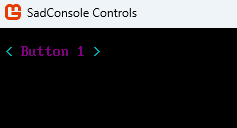
How to set the colors for a control
Section titled “How to set the colors for a control”Colors set directly on a control override all other color sources. Call SetThemeColors(Colors) on the control, passing in the colors you want to use. Pass null to remove previously set colors from the control.
// Create the new colorsColors newColors = Colors.Default.Clone();
newColors.Red = Color.Red.GetBrightest();newColors.ControlForegroundNormal.SetColor(Color.Purple);newColors.RebuildAppearances();
// Create the controls console, which has a controls hostControlsConsole console = new(GameHost.Instance.ScreenCellsX, GameHost.Instance.ScreenCellsY);
// Add first button with custom colorsButton button1 = new("Button 1");button1.SetThemeColors(newColors);button1.Position = new Point(1, 1);console.Controls.Add(button1);
// Add second button without custom colorsButton button2 = new("Button 2");button2.Position = new Point(1, 2);console.Controls.Add(button2);
// Show the consoleGameHost.Instance.Screen = console;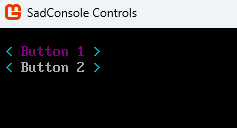
How to reset the colors to the default
Section titled “How to reset the colors to the default”If you change the SadConsole.UI.Colors.Default colors and want to revert them, set the property to the return value of the CreateAnsi method. SadConsole calls this method to generate its initial colors.
Colors.Default = Colors.CreateAnsi();How to get the colors used by a control or host
Section titled “How to get the colors used by a control or host”Sometimes you need to find the colors a control or host uses, so you can match them. This is most common when you’ve created your own control and need to know what colors to use. Another common scenario is drawing something that matches a control’s colors. For example, the Colors type defines a Lines color, which colors various parts of controls, such as the RadioButton’s brackets or the ListBox’s surrounding box. Use this color when drawing other lines on the surface host to match the controls.
Call the control’s FindThemeColors method. This searches the control and then the host for colors. If no colors exist, it returns the defaults.
Colors assignedColors = someControl.FindThemeColors();Get the colors of a control host with the GetThemeColors method. This method checks whether the host has a colors value assigned to the ThemeColors property and returns it. If the property is null, it returns the default colors.
// Using a ControlsConsole which provides a ControlHostColors hostColors = console.Controls.GetThemeColors();